Trusted by industry leaders


The problem
Operational knowledge is your most expensive asset. And it keeps leaving
Doing more with the team you already have is no longer a choice — for most operations it's the only path open.
Turnover erases know-how
When an experienced employee leaves, their site- and task-specific knowledge leaves with them. The next person starts from scratch.
Rules and documentation keep growing
More procedures, more evidence requirements, more audits — and the answer has to be right the first time, on site, under time pressure.
Experts can't be everywhere
Supervisors and specialists spend hours a day answering the same routine questions instead of handling what actually needs them.
Context-aware answers
Answers that fit the person asking
The assistant knows who's asking, where they're working, and which rules apply there. Every answer comes from your own approved documents — nothing else.
Knows the site and the role
The same question gets a different answer at Frankfurt T1 than at Munich T2 — because the rules there are different.
Answers only from your documents
Your procedures, regulations, and training content. No public internet. Every answer shows its source.
Voice or text
Workers speak the question or type it. The answer comes back in their own language.
Says “I don't know” instead of guessing
If your documents don't cover it, the assistant tells you so. It never makes something up.
Everything is logged
Every question and answer is saved with time, role, and user ID. Export it for an audit in one click.
Works without internet
Optional offline mode for tunnels, depots, and restricted areas.
The hidden cost
Your teams are already asking AI. Just not yours
General AI tools are running on personal phones during shifts right now — translating instructions, drafting reports, looking up procedures. Your operational data goes with them.
What's happening today
paste company data into public AI tools. Most don't tell anyone.
runs through personal, non-corporate accounts.
What replaces it, sanctioned and yours

Trusted answers only
quotes only your own instructions, procedures, and internal guidelines. Will not invent.
Your data stays your data
a closed, private environment; nothing leaves your perimeter, nothing trains a public model.
Every Q&A logged and time-stamped
audit evidence generated automatically.
You decide who sees what
per role, per site, per shift.
You don't stop your teams using AI by banning it. You replace it with something better — and yours.
In the moments that count
Different shifts. Different problems. Same assistant
Voice, photo, or text — an answer in seconds, from your own procedures, with a full audit trail.
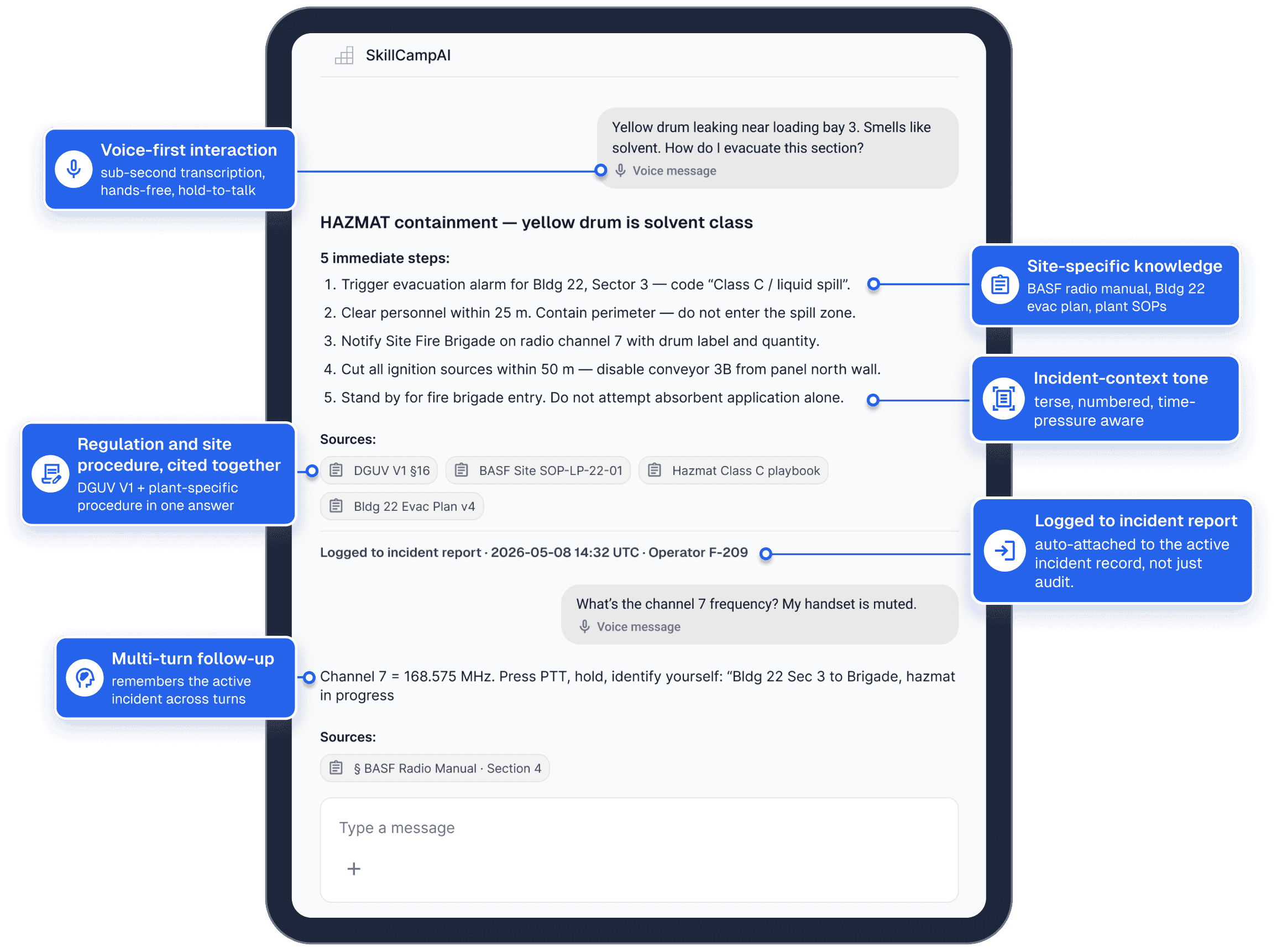
Live incident demo
Here's what that looks like in a real emergency
A fire-safety operator at a chemical plant, mid-incident, hands full — voice only. Watch what the assistant does.
How it works
Your documents go in. Cited answers come out. Everything is logged
The assistant reads only from materials you've approved. Three kinds of sources feed it — and every answer shows exactly where it came from.
Approved sources
Company procedures
- Patrol procedures
- Screening manuals
- Role binders
Regulations
- DIN 77200, EU 2025/920, §34a GewO, ISAGO, DGUV
Training knowledge
- VR scenario decisions
- Desktop course content
- Instructor notes
Operations Assistant
- Retrieves only from your documents
- Never guesses
- Logs every interaction
- Works offline
Cited answer + audit log
5 immediate steps
- Trigger evacuation alarm
- Clear personnel within 25 m
- Notify Site Fire Brigade
Logged to incident report:
14:32 UTC · Operator F-209
Comparison
ChatGPT can't do this. By design
When your team uses public AI, your data leaves your environment, the answer cites Reddit, and the regulator never approved the source. The Operations Assistant is built the opposite way.


Public LLM (e.g. ChatGPT)
generic, hosted, internet-trained
- Confidential SOPs leave your environment with every prompt
- Cites Reddit, blogs, scraped content — no regulator approval
- Hallucinates plausible procedures that don't exist
- Internet required — fails in tunnels, depots, secure zones
- No audit trail. No structured logging. No replay.
- No knowledge of role, site, shift, regulation context

Operations Assistant
private, cited, deployable on-prem
- Your data stays on your infrastructure — three deployment models
- Cites only your certified SOPs, regulations, training
- Says “not covered” instead of guessing — it can't make things up
- Optional offline mode for tunnels, depots, restricted zones
- Every interaction logged · audit-ready export · DIN 77200
- Knows the operator, role, site, shift, and active regulation
The economics
A simple model. A short payback
Indicative for a typical large rollout — we model the exact numbers for your headcount and operations.
Five value levers
Routine questions absorbed
The assistant handles 60–80% of recurring frontline questions; supervisors get 20–30 minutes back per employee per shift.
New hires productive faster
Time from hire to fully productive drops by up to 5×. Less shadowing, more productive hours from day one.
Fewer incidents, better evidence
Better-written reports, fewer wrong escalations, cleaner audits. A single avoided compliance incident can pay for the platform many times over.
A stronger offer to your clients
An auditable, AI-supported service is becoming a differentiator in bids and renewals.
Fewer people walk away
Clients see meaningful turnover drops — saving recruitment, onboarding, and requalification costs.
Typical payback window
Most clients pay back the platform with one or two of these levers — the rest are upside.
Industries
One platform. Any safety-critical industry
The work where decisions under pressure define the outcome. We have built scenarios for twelve industries so far. The platform adapts to any safety-critical operation.

Security Operations
Standardized VR training for operational security teams across all locations.
↓ 35% onboarding timeExplore Industry →

Aviation & Ground Handling
Airport ground crew qualification with immersive scenario-based modules.
↓ 40% error rateExplore Industry →

Aviation Security
Comprehensive security screening and threat response training programs.
3× faster certificationExplore Industry →

Fire & Safety
Emergency response readiness through realistic VR fire drill simulations.
↓ 50% incident response timeExplore Industry →

Deicing Operations
Aircraft deicing procedure training with real-time assessment and feedback.
↓ 60% retraining costExplore Industry →

Drone Threat Detection
VR training for drone threat identification, classification, and countermeasure response.
↑ 45% threat detection accuracyExplore Industry →
Deployment options
Runs wherever your security team needs it to
Three ways to deploy. Pick the one your security team can approve today.
SkillCampVR Cloud
Hosted on our EU infrastructure (Frankfurt + Amsterdam). Fastest to launch, lowest IT lift, GDPR-compliant.
Customer Cloud
We deploy into your AWS, Azure, or private VPC. Your tenant, your encryption keys, your audit boundary.
On-Premises
Air-gapped deployment for VS-NfD-grade environments. The model and data never leave your network.
Built to fit your operations
Speaks your team's language. Plugs into your stack
Languages
German + English native. More on request.
 German
 English
 French
 Italian
 Spanish
 Netherlands
 Polish
 Turkish
+ on request
Integrations
HRIS:


LMS:


SIEM:


Identity:


Getting started
Your documents, as they are. Live in 4–6 weeks
Hand over your documents as-is
Procedures, work instructions, manuals, site documents — PDF, Word, even video.
No reformatting, no IT project.
We build your private knowledge base
Your content is ingested, structured, and access-scoped by role, site, and team.
Your teams ask, it answers
On any smartphone or tablet, in any language, with every answer cited and logged.
Frequently asked questions
Common Questions About AI Operations Assistant
Yes. Stand-alone deployment is supported. The strongest fit is alongside the VR Training Platform, but stand-alone is the right starting point if your training is elsewhere.
Primary input is photo + short text. Voice supported for quieter contexts.
Single sign-on identifies the user, role, and permissions. Location services identify the site.
Any language. Answers in the user's preferred language, regardless of the language of the source content.
No. Critical procedures cache locally. Data syncs when connectivity returns.
Authorised personnel upload new documents through a secure interface; the AI re-indexes automatically. Updates are versioned and auditable.
Yes. Multi-tenant by site, region, business unit, or end-client.
Yes — Article 4 compliance is built in, and the records you need are generated automatically.